|
|
| (未顯示同一使用者於中間所作的 6次修訂) |
| 第1行: |
第1行: |
| | The '''ODROID-C4''' is an Amlogic S905X3 single-board computer. These notes cover its pin map and building Android for it. |
| | |
| [[File:C4_k.jpg|500px|ODROID-C4]] | | [[File:C4_k.jpg|500px|ODROID-C4]] |
|
| |
|
| 第7行: |
第9行: |
|
| |
|
| == Pin definition == | | == Pin definition == |
| [[file:C4_40pinmap_rev0.4.png|500px|]] | | [[File:C4_40pinmap_rev0.4.png|500px|]] |
|
| |
|
| * UART signals are driven at 1.8V. | | * UART signals are driven at 1.8V. |
| 第49行: |
第51行: |
| </pre> | | </pre> |
|
| |
|
| == Installing initial images == | | == One touch self install == |
| *Select fastboot mode by turning ON switch 3 (for details, refer to the HiKey 960 Getting Started guide).
| | ; Create image |
| *Power the board.
| | : make -j<core number> selfinstall |
| *Flash initial images:
| |
| ** cd device/linaro/hikey/installer/hikey960
| |
| *Turn OFF switch 3 and power cycle the board.
| |
|
| |
|
| == Flashing images ==
| | ; Burn image |
| *Enter fastboot mode by turning ON switch 3.
| |
| *Flash images by running the following commands:
| |
| ** fastboot flash boot out/target/product/hikey960/boot.img
| |
| *Turn OFF switch 3 and power cycle the board.
| |
| | |
| == Building the kernel ==
| |
| *Run the following commands:
| |
| **mkdir repo-common
| |
| **cd repo-common
| |
| **repo init -u https://android.googlesource.com/kernel/manifest -b hikey-linaro-android-4.19
| |
| **repo sync -j8 -c
| |
| **rm -rf out
| |
| **rm build.config
| |
| **BUILD_CONFIG=hikey-linaro/build.config.hikey960 ./build/build.sh
| |
| *Update the kernel in the boot image.
| |
| **Copy hi3660-hikey960.dtb (out/android-hikey-linaro-4.19/dist/hi3660-hikey960.dtb) to the hikey-kernel directory as file hi3660-hikey960.dtb-4.19.
| |
| **Copy the Image file (out/android-hikey-linaro-4.19/dist/Image.gz-dtb) to the hikey-kernel directory as file Image.gz-dtb-hikey960-4.19.
| |
| <pre> | | <pre> |
| cp repo-common/out/android-hikey-linaro-4.19/dist/hi3660-hikey960.dtb hikey960/device/linaro/hikey-kernel/hi3660-hikey960.dtb-4.19
| | $ sudo dd if=out/target/product/odroidc4/selfinstall-odroidc4.img of=/dev/sdd |
| cp repo-common/out/android-hikey-linaro-4.19/dist/Image.gz-dtb hikey960/device/linaro/hikey-kernel/Image.gz-dtb-hikey960-4.19
| | $ sync |
| | $ sudo eject /dev/sdd |
| </pre> | | </pre> |
| *Make the boot image:
| |
| **make bootimage -j24
| |
|
| |
|
| == Enable UART ==
| |
| * In repo-common/hikey-linaro
| |
| <pre>
| |
| diff --git a/arch/arm64/boot/dts/hisilicon/hi3660.dtsi b/arch/arm64/boot/dts/hisilicon/hi3660.dtsi
| |
| index 80334e500..a2f1de30b 100644
| |
| --- a/arch/arm64/boot/dts/hisilicon/hi3660.dtsi
| |
| +++ b/arch/arm64/boot/dts/hisilicon/hi3660.dtsi
| |
| @@ -494,7 +494,7 @@
| |
| clock-names = "uartclk", "apb_pclk";
| |
| pinctrl-names = "default";
| |
| pinctrl-0 = <&uart0_pmx_func &uart0_cfg_func>;
| |
| - status = "disabled";
| |
| + status = "ok";
| |
| };
| |
|
| |
| uart1: serial@fdf00000 {
| |
| @@ -508,7 +508,7 @@
| |
| clock-names = "uartclk", "apb_pclk";
| |
| pinctrl-names = "default";
| |
| pinctrl-0 = <&uart1_pmx_func &uart1_cfg_func>;
| |
| - status = "disabled";
| |
| + status = "ok";
| |
| };
| |
|
| |
| uart2: serial@fdf03000 {
| |
| </pre>
| |
|
| |
| == Setting the serial number ==
| |
| === To set the random serial number, run ===
| |
| **fastboot getvar nve:SN@16\_DIGIT\_NUMBER
| |
| *Bootloader exports the generated serial number to the kernel using androidboot.serialno=.
| |
|
| |
| === Setting monitor resolution ===
| |
| *Edit the device/linaro/hikey/hikey960/BoardConfig.mk parameter BOARD_KERNEL_CMDLINE and configure the video setting. For example, the setting for a 24-inch monitor is video=HDMI-A-1:1280x800@60.
| |
|
| |
|
| == Android note == | | == Android note == |
| 第121行: |
第68行: |
|
| |
|
| == Reference == | | == Reference == |
| * [https://source.android.com/setup/build/devices, Build steps] | | * [https://wiki.odroid.com/odroid-c4/software/building_android ODROID-C4 Building android] |
| * [https://snapshots.linaro.org/96boards/hikey960/linaro/aosp-master/latest/, Pre build image] | | * [https://wiki.odroid.com/odroid-c4/odroid-c4 ODROID-C4] |
| | |
| | [[Category:Boards and SoCs]] |
The ODROID-C4 is an Amlogic S905X3 single-board computer. These notes cover its pin map and building Android for it.
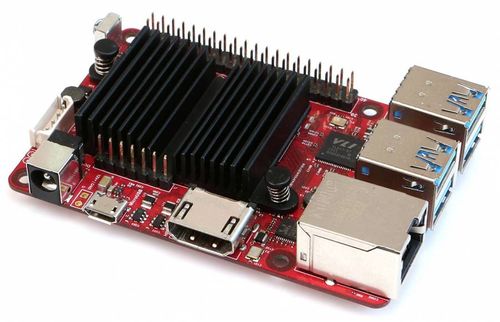
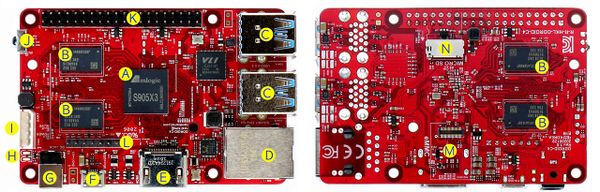
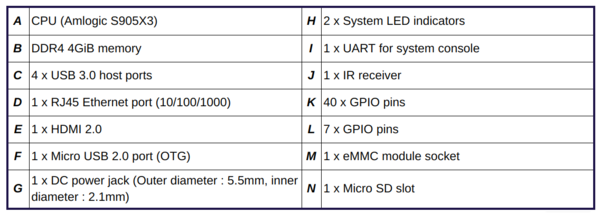
Board Description
Pin definition
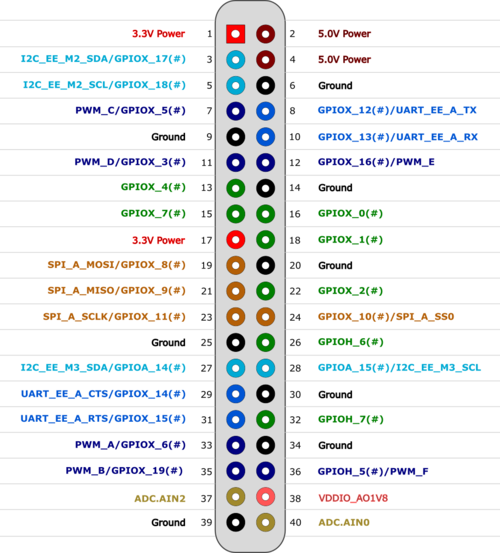
- UART signals are driven at 1.8V.
Build Android
Download Toolchains
- U-boot
- http://releases.linaro.org/archive/14.09/components/toolchain/binaries/gcc-linaro-aarch64-none-elf-4.9-2014.09_linux.tar.xz
- http://releases.linaro.org/archive/14.04/components/toolchain/binaries/gcc-linaro-arm-none-eabi-4.8-2014.04_linux.tar.xz
- Linux kernel
- https://releases.linaro.org/components/toolchain/binaries/6.3-2017.05/aarch64-linux-gnu/gcc-linaro-6.3.1-2017.05-x86_64_aarch64-linux-gnu.tar.xz
Set PATH
$ export PATH=$PATH:/opt/toolchains/gcc-linaro-aarch64-none-elf-4.9-2014.09_linux/bin
$ export PATH=$PATH:/opt/toolchains/gcc-linaro-arm-none-eabi-4.8-2014.04_linux/bin
$ export PATH=$PATH:/opt/toolchains/gcc-linaro-6.3.1-2017.05-x86_64_aarch64-linux-gnu/bin
Check out full source code
- 32 bit
$ mkdir odroid-c4
$ cd odroid-c4
$ repo init -u https://github.com/hardkernel/android.git -b g12_9.0.0_master
$ repo sync
- 64 bit
$ mkdir odroid-c4
$ cd odroid-c4
$ repo init -u https://github.com/hardkernel/android.git -b g12_9.0.0_64_master
$ repo sync
Build
$ source build/envsetup.sh
$ lunch odroidc4-eng
$ make -j<core number>
One touch self install
- Create image
- make -j<core number> selfinstall
- Burn image
$ sudo dd if=out/target/product/odroidc4/selfinstall-odroidc4.img of=/dev/sdd
$ sync
$ sudo eject /dev/sdd
Android note
- Disable ICMP for enable ping
- sysctl -w net.ipv4.icmp_echo_ignore_all=0
Reference


